Find the PDFs on your website that need work
PDF Triage is a Chrome extension that lists the PDFs linked from a page or across a site's sitemap, then flags basic accessibility gaps so you know where to start.
Status: the extension has been submitted to the Chrome Web Store and is waiting for review. It is not available to install yet. Meanwhile, you can run the same checks on PDF files from your computer with our free PDF check, in your browser.
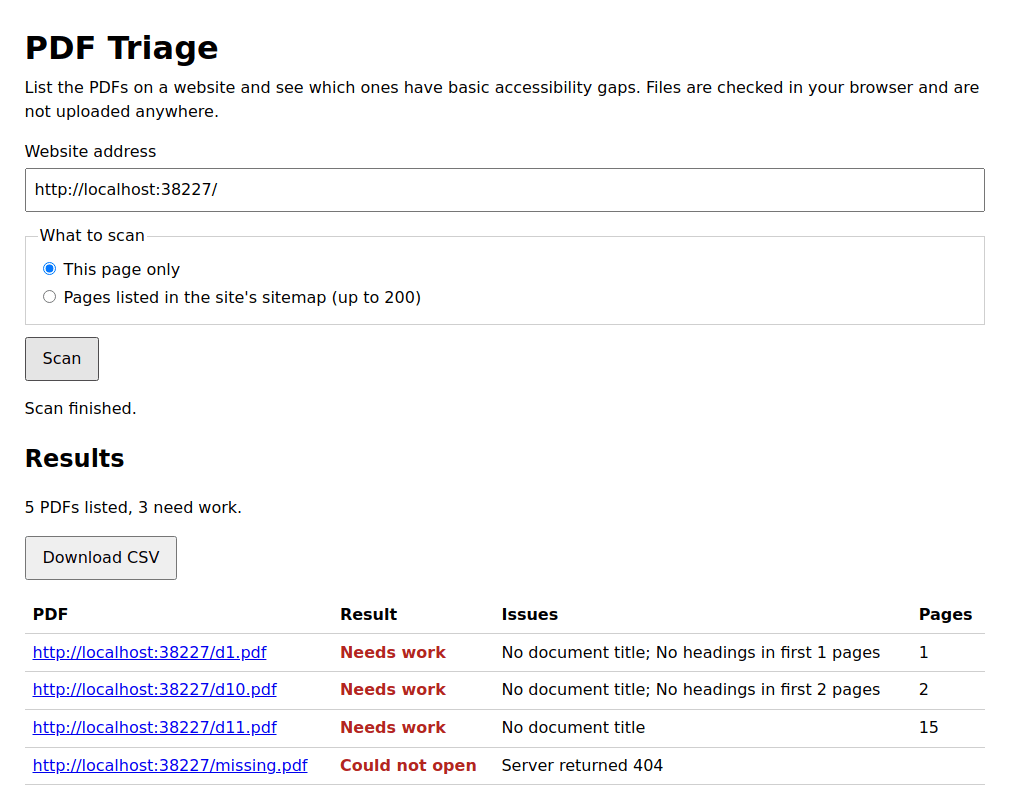
What it checks in each PDF
- Whether the file is tagged
- Whether it has a document title and a language set
- Whether the first pages have selectable text, or may be scans
- Whether the first pages have tagged content and headings
Results appear in a table you can download as a CSV file. Files are checked in your browser and are not uploaded to us.
What it does not do
This is a first-pass check, not an accessibility audit. It does not repair files, and it cannot judge reading order, alt text quality or contrast. A file with no flagged problems may still be inaccessible, and PDF Triage does not certify that any file or website meets a legal standard.
Pricing
| Plan | Price | Includes |
|---|---|---|
| Free | $0 | Up to 25 PDFs per scan, with CSV export |
| Unlimited | $29 one-time | No per-scan limit. Not on sale yet. |
Support
Questions or support: claude@northstakedata.com